Common Snowflake Implementation Mistakes and How to Avoid Them

Common Snowflake Implementation Mistakes and How to Avoid Them

If your Snowflake bill keeps climbing while your dashboards keep lagging, you are not alone. Teams roll out Snowflake expecting elastic scale and lower total cost of ownership, only to hit walls within months. Most Snowflake implementation mistakes are not about the platform itself. They are about how it gets set up. A rushed migration, an ignored warehouse strategy, or governance treated as an afterthought can quietly turn a powerful data cloud into an expensive headache. Here is what trips up even experienced data teams, and what actually works to avoid it in 2026.

Why Snowflake Implementations Go Off Track

Snowflake is often sold as plug and play. It is not. Its architecture separates compute from storage, organizes data into micro-partitions, and bills by the second, rewarding teams who plan intentionally. Most production pain is not caused by Snowflake’s limitations. It comes from legacy habits carried over from older warehouses, rushed timelines, and governance pushed to “phase two.”

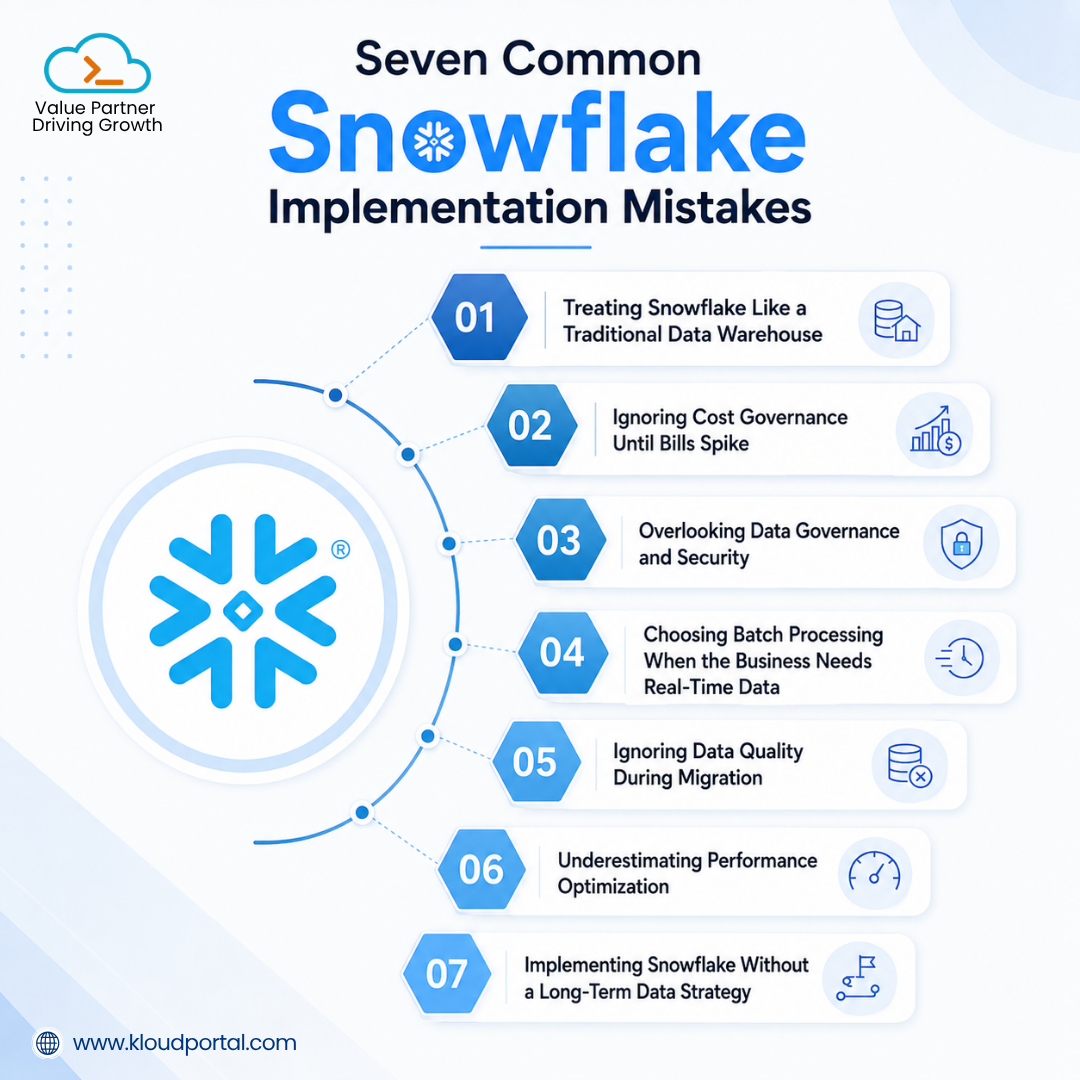
Seven Common Snowflake Implementation Mistakes and How to Fix Them

1. Treating Snowflake Like a Traditional Data Warehouse

Migrating existing databases “as-is” ignores Snowflake’s core advantage: separated storage and compute. Traditional warehouses couple these tightly, so lifting workloads over without redesigning them leads to wasted spend and poor performance.

Fix: Separate ETL, BI, and data science into dedicated virtual warehouses, enable auto-suspend and auto-resume, and modernize legacy schemas instead of a straight lift-and-shift.

2. Ignoring Cost Governance Until Bills Spike

Consumption-based pricing is a strength until warehouses run continuously, clusters are oversized, or queries go unoptimized. Most teams only start governing costs after an unexpectedly high bill arrives.

Fix: Put governance in place from day one with Snowflake warehouse sizing best practices, Resource Monitors, auto-suspension, query history analysis, and cost dashboards, with regular workload reviews to catch waste early.

3. Overlooking Data Governance and Security

As more teams onboard to Snowflake, inconsistent access controls and metadata management create duplicate datasets, conflicting reports, and compliance risk — problems that compound once AI applications start depending on that same data.

Fix: Establish role-based access control and data governance, data classification policies, consistent naming conventions, lineage tracking, and centralized metadata management (Snowflake Horizon Catalog where applicable) early rather than retrofitting governance later.

4. Choosing Batch Processing When the Business Needs Real-Time Data

Overnight batch pipelines still work for some reporting, but use cases like fraud detection, inventory management, and personalization need near real-time data. A retailer relying on nightly inventory updates, for example, can show items as in stock hours after they’ve actually sold out.
Fix: Match ingestion strategy to business need. Combining real-time data pipelines with Snowpipe Streaming and Dynamic Tables lets time-sensitive data flow into dashboards within minutes rather than overnight.
7 Snowflake Implementation Mistakes to Avoid in 2026

5. Ignoring Data Quality During Migration

Duplicate records, missing values, schema inconsistencies, and late-arriving data can undermine analytics and AI models no matter how capable the platform is.

Fix: Build automated validation into every pipeline stage, and use continuous monitoring and data observability tools to catch issues before they reach business users.

6. Underestimating Performance Optimization

Snowflake doesn’t automatically make every query efficient. Oversized or undersized warehouses, poor partitioning, unnecessary joins, and competing workloads on shared warehouses all erode performance and drive up cost.

Fix: Right-size warehouses by workload, separate ETL, reporting, and data science compute, optimize SQL and eliminate redundant transformations, use clustering strategically, and monitor Query History and Query Profile continuously.

7. Implementing Snowflake Without a Long-Term Data Strategy

Focusing only on migration, without planning for AI, advanced analytics, self-service reporting, or data sharing, means the platform will need significant rework as needs evolve.

Fix: Build a roadmap that ties the implementation to long-term business goals: AI initiatives, real-time analytics, secure data sharing, governance, and scalable architecture.

A Real-World Scenario: When “It Works” Is Not Enough

Picture a mid-sized retail company migrating its analytics warehouse to Snowflake. The migration succeeds, dashboards load, but three months in, monthly credit consumption has tripled. Once traced, the cause is one oversized warehouse running every workload, an ungoverned ingestion pipeline pulling in thousands of tiny files daily, and zero clustering on the largest fact table. None of it was a Snowflake failure. It was an implementation gap, exactly what experienced data engineering teams are trained to catch before go-live.

How KloudPortal Helps You Get More from Snowflake

A successful Snowflake implementation is measured by business outcomes, not migration speed. KloudPortal’s Snowflake implementation services take an engineering-first approach — architecture design, data migration, governance, performance optimization, and cost management — built to scale with evolving needs.

Whether you’re implementing Snowflake for the first time, modernizing a legacy warehouse, or optimizing an existing deployment, our team works to keep your platform secure, high-performing, and aligned with your business objectives.

Conclusion

Snowflake provides a powerful foundation, but success depends on implementation, not technology alone. Organizations that prioritize architecture, governance, cost optimization, and performance from the outset are better positioned for reliable analytics, strong AI outcomes, and confident scaling.

Frequently Asked Questions

What is the most common Snowflake implementation mistake?

Migrating legacy schema designs into Snowflake without adapting them for its columnar, micro-partitioned architecture. This single habit accounts for much of the performance and cost pain teams see after migration.

How can I avoid overspending during Snowflake implementation?

Segment warehouses by workload type, enable auto-suspend, right-size instead of defaulting to one large warehouse, and monitor usage with Query Profile from week one.

Why do Snowflake governance issues cause implementation delays?

Skipped access controls and data cataloging create rework once teams try to scale, often adding two to six months to a project timeline as gaps get patched retroactively.

Should I hire a Snowflake implementation partner or handle it in-house?

It depends on existing in-house Snowflake architecture experience. Complex migrations and cost optimization tend to benefit from a partner with a proven delivery history rather than a team learning Snowflake on a live project.
How Enterprises Can Reduce Snowflake Costs by Up to 40% with Smart Data Engineering

How Enterprises Can Reduce Snowflake Costs by Up to 40% with Smart Data Engineering

Snowflake has become the data platform of choice for enterprises looking to build scalable analytics, AI, and cloud-native applications. Its flexibility and pay-as-you-go model make it easy to get started—and just as easy for costs to grow unnoticed as data volumes, users, and workloads increase.

Many organizations assume rising Snowflake costs are simply the price of growth. In reality, they’re often the result of inefficient data engineering practices rather than increasing business demand.

The good news is that reducing Snowflake costs doesn’t mean compromising performance or limiting innovation. With smarter pipeline design, optimized compute usage, and better governance, enterprises can significantly reduce spend while building a faster, more scalable data platform.

In this article, we’ll explore seven practical strategies that help organizations optimize Snowflake costs without sacrificing business outcomes.

7 Smart Ways to Reduce Snowflake Costs

  1.  Optimize data pipelines
  2.  Right-size virtual warehouses
  3.  Eliminate redundant processing
  4.  Improve query performance
  5.  Manage storage efficiently
  6.  Monitor costs continuously
  7.  Align engineering with business priorities

Why Snowflake Costs Increase Faster Than Expected

Most organizations don’t overspend intentionally—they overspend gradually. A warehouse left running overnight. Compute resources sized for peak demand but rarely utilized. Multiple teams creating similar transformations. Pipelines reprocessing the same data every day.

Individually, these decisions seem harmless. Over time, they quietly compound into a significantly larger Snowflake bill.

The most common contributors include:

  • Idle virtual warehouses running around the clock
  • Oversized compute for lightweight workloads
  • Duplicate datasets and transformations across teams
  • ELT pipelines that reprocess entire tables instead of only changed data

Fortunately, these are engineering challenges, not platform limitations and they’re all fixable.

How to Optimize Snowflake Data Pipelines

Data pipelines are often where the largest optimization opportunities exist.

Many organizations continue to process complete datasets even when only a small percentage of records have changed. This wastes compute credits, extends processing time, and delays downstream analytics. A more efficient approach is to process only what’s new.

Effective pipeline optimization typically includes:

  • Incremental data loading
  • Change Data Capture (CDC)
  • Metadata-driven pipelines
  • Snowflake Dynamic Tables
  • Automated task orchestration

These practices reduce unnecessary compute consumption while improving pipeline reliability and execution speed.

Right-Size Snowflake Virtual Warehouses

Virtual warehouses are typically the largest contributor to Snowflake compute costs and one of the easiest areas to optimize.

Many organizations provision warehouses for peak demand, leave them running continuously, or use a single warehouse for multiple workloads with very different resource requirements.

Simple improvements can make an immediate difference:

  • Enable auto-suspend and auto-resume
  • Right-size warehouses based on workload
  • Separate ETL, BI, and AI workloads
  • Continuously monitor warehouse utilization

Matching compute resources to actual demand helps reduce wasted credits without affecting user experience.

Eliminate Redundant Data Processing

As organizations scale, duplicate transformations become surprisingly common.

Different teams often solve the same problem independently, creating multiple versions of similar datasets and business logic.

A Medallion Architecture—with Bronze, Silver, and Gold layers helps eliminate this duplication by creating reusable, governed data products that can serve multiple teams from a single trusted source.

Instead of rebuilding transformations repeatedly, organizations build once and consume many times.

Monitor and Optimize Query Performance

Expensive queries rarely become obvious overnight.

Instead, they slowly consume more compute by scanning excessive data or running inefficient execution plans until costs become noticeable.

Regularly reviewing query history and warehouse utilization helps identify these issues before they become expensive habits.

Common optimization techniques include:

  • Reviewing Query History
  • Applying clustering keys where appropriate
  • Using materialized views for repetitive queries
  • Leveraging Search Optimization Service for selective workloads

Small improvements across frequently executed queries can significantly reduce compute consumption over time.

Manage Storage and Data Lifecycle Costs

Storage costs usually increase gradually rather than dramatically, making them easy to overlook.

Old tables that are never queried, overly generous Time Travel retention settings, and unused datasets continue consuming storage long after they’ve stopped delivering value.

A disciplined lifecycle strategy helps control long-term costs by:

  • Archiving inactive data
  • Adjusting Time Travel retention to business needs
  • Removing obsolete datasets
  • Applying appropriate retention policies

Keeping storage aligned with actual business usage prevents unnecessary cost accumulation.

Build Cost Observability Into Your Data Platform

The organizations that manage Snowflake costs most effectively don’t wait for the monthly invoice to identify problems.

Instead, they continuously monitor platform health and usage patterns.

Key metrics include:

  • Warehouse utilization
  • Pipeline execution failures
  • Data freshness
  • Credit consumption by workload
  • Cost trends across teams

This visibility enables engineering teams to identify inefficiencies early and make informed optimization decisions before costs escalate.

Align Engineering Decisions With Business Value

Effective Snowflake cost optimization isn’t about spending less—it’s about spending smarter.

Not every workload requires real-time processing or high-performance compute. Many reporting workloads can run on smaller warehouses or less frequent schedules without affecting business outcomes.

When engineering decisions are aligned with business priorities, organizations reduce unnecessary spend while maintaining the performance users actually need.

Enterprises that treat Snowflake cost optimization as an ongoing engineering discipline—not a one-time cleanup exercise—build data platforms that are more scalable, efficient, and ready to support advanced analytics and enterprise AI.

How KloudPortal Helps Enterprises Reduce Snowflake Costs

At KloudPortal, we help enterprises optimize Snowflake environments through modern data engineering practices that improve both performance and cost efficiency.

Our approach includes:

  • Metadata-driven data pipelines
  • Workload-aware compute optimization
  • Query performance tuning
  • Data governance and cost observability
  • Modern Medallion Architecture implementation

Whether you’re modernizing an existing Snowflake environment or building a new AI-ready data platform, we help ensure every Snowflake credit delivers measurable business value.

Frequently Asked Questions

Why do Snowflake costs increase over time even without adding new data?

Snowflake costs often increase because of inefficient resource utilization rather than data growth. Idle warehouses, oversized compute resources, duplicate transformations, and expanding storage all contribute to higher spending over time.

What is the fastest way to reduce Snowflake compute costs?

Enabling auto-suspend and auto-resume, right-sizing virtual warehouses, and optimizing frequently executed queries are usually the quickest ways to reduce compute costs without affecting performance. 

Does reducing Snowflake costs affect performance or data quality?

No. When optimization is driven by better engineering practices—such as incremental loading, metadata-driven pipelines, workload-aware compute, and query optimization—organizations often improve both performance and reliability while lowering costs. 

Snowflake Data Pipeline Architecture: Best Practices for Data Engineers 

Snowflake Data Pipeline Architecture: Best Practices for Data Engineers 

Building a data pipeline is only the beginning. As organizations add new data sources, real-time applications, and AI workloads, keeping those pipelines reliable, scalable, and cost-efficient becomes a much bigger challenge.

A pipeline that performs well with a handful of data sources can quickly become difficult to manage when dozens of applications, event streams, and analytics platforms depend on the same data ecosystem. Without a well-planned architecture, maintenance overhead grows, costs increase, and troubleshooting becomes more complex.

53% of engineering time is spent maintaining existing data pipelines rather than building new capabilities. (Source: Fivetran 2026 Data Connectivity Report)
For organizations using Snowflake, architecture is one of the biggest factors influencing long-term performance and operational efficiency. A well-designed Snowflake data pipeline architecture improves reliability, simplifies maintenance, optimizes compute usage, and provides a strong foundation for analytics, machine learning, and AI applications.

This blog explores the architectural principles and best practices data engineers should follow when building Snowflake data pipelines.

What Is a Snowflake Data Pipeline?

A Snowflake data pipeline is a structured workflow that moves data from source systems into Snowflake, transforms it into usable formats, and delivers it to downstream consumers such as dashboards, applications, AI models, and business users.

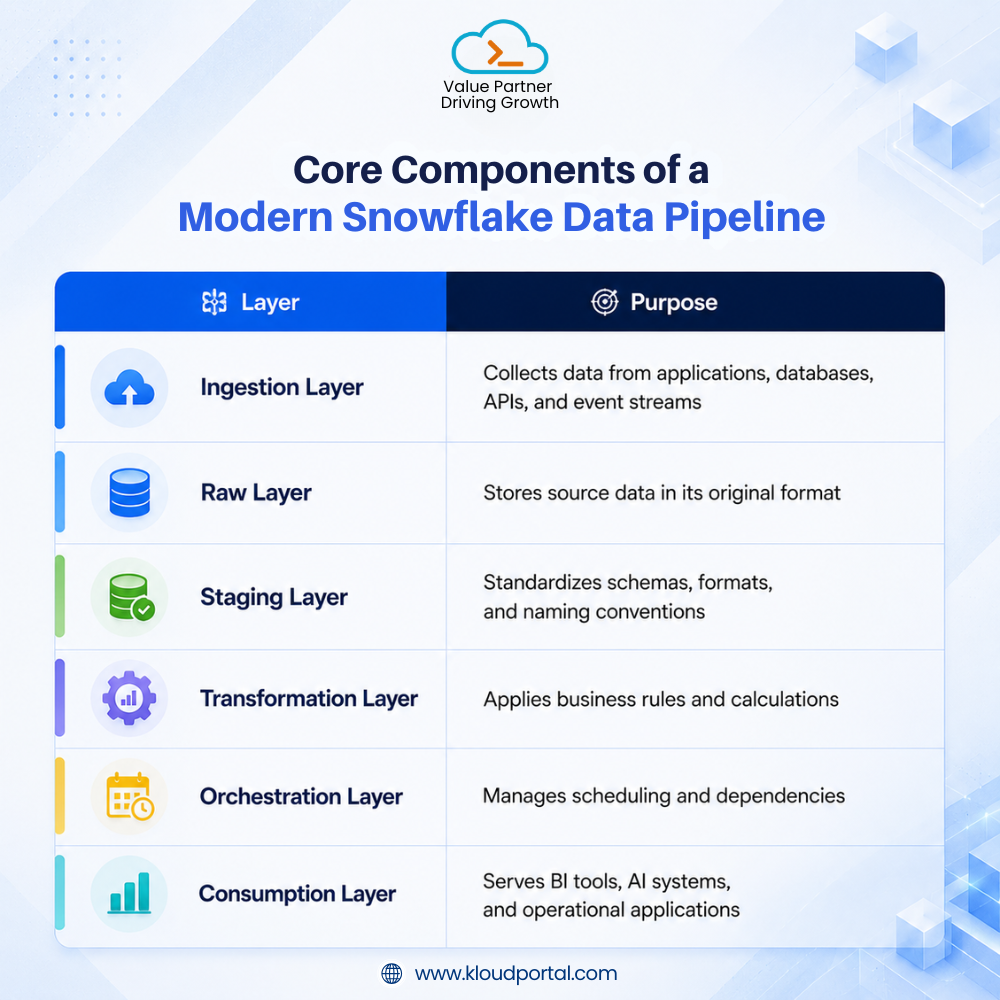
A typical Snowflake pipeline includes data ingestion, raw data storage, data transformation, workflow orchestration, data governance, and consumption and analytics.

The architecture ensures data remains reliable, secure, and easy to consume as business requirements evolve.

Core Components of a Modern Snowflake Data Pipeline

Every production-grade Snowflake pipeline consists of several architectural layers, each responsible for a specific stage in the data lifecycle. Keeping these responsibilities separate improves scalability, simplifies troubleshooting, and makes future enhancements easier to implement.

Snowflake Data Pipeline Architecture Best Practices

7 Snowflake Data Pipeline Architecture Best Practices

1. Separate Raw, Staging, and Curated Layers

One of the most common architectural mistakes is applying transformations directly to raw data.

A layered approach creates clear boundaries between ingestion, standardization, and business logic. It also makes troubleshooting easier when source systems change unexpectedly.

A common structure includes:

  • RAW schema for source data
  • STG schema for standardized datasets
  • CURATED or MART schema for business-ready data

2. Choose the Right Ingestion Strategy

Not every workload requires the same level of data freshness.

Method Best For Latency
Snowpipe File-based ingestion, logs, exports Seconds to minutes
Snowpipe Streaming Application events and telemetry Sub-second
Many organizations successfully use both approaches depending on business requirements.

3. Use Dynamic Tables Strategically

Dynamic Tables simplify refresh management by automatically updating downstream datasets based on predefined lag requirements. They work particularly well for incremental transformations, near-real-time reporting, and operational analytics.

However, organizations with mature dbt practices often combine Dynamic Tables and dbt rather than replacing one with the other.

4. Optimize Virtual Warehouses Early

Warehouse sprawl, not storage, is usually what drives Snowflake costs out of budget: idle clusters left running, warehouses sized for peak load that almost never hits, and multi-cluster settings nobody revisited after launch.

Some practical optimization techniques include enabling auto-suspend, separating workloads into dedicated warehouses, using multi-cluster warehouses only when necessary, and monitoring warehouse utilization regularly.

Decide warehouse sizing and isolation at the same time as ingestion and transformation, not after the first unexpectedly large invoice arrives.

5. Implement Data Quality Checks Upstream

Data quality issues become more expensive as they move downstream. Instead of validating data after reports break, implement checks during ingestion and transformation.

Key validations include schema validation, freshness monitoring, null-value checks, and business rule validation.

6. Use Streams for Incremental Processing

Reloading an entire table barely registers at small data volumes. Past a few million rows, that same reload starts dominating the compute bill.

Snowflake Streams provide change data capture (CDC) functionality by tracking inserts, updates, and deletes. Benefits include lower compute costs, faster execution times, reduced resource consumption, and better scalability.

7. Build Governance Into the Architecture

The most resilient pipelines treat governance as part of the architecture rather than a compliance exercise added later.

Modern Snowflake architectures typically include role-based access control (RBAC), data masking policies, object tagging, data classification, and lineage tracking.

Real-World Use Case: Modernizing Inventory Data Pipelines

From overnight batch to event-driven ingestion

Consider a retailer managing inventory across multiple stores. With overnight batch processing, inventory reports refresh only once a day, creating a delay between a sale and when updated stock levels appear in dashboards. By using Snowpipe Streaming for real-time ingestion and Dynamic Tables for automated transformations, inventory updates reach dashboards within minutes, giving teams faster visibility and enabling quicker business decisions.

Why Snowflake Pipeline Design Matters

The role of data pipelines is expanding beyond analytics. Organizations are increasingly using Snowflake to support AI copilots, agentic AI applications, recommendation engines, retrieval-augmented generation (RAG) systems, and predictive analytics.

This shift places greater emphasis on data freshness, governance, lineage, and reliability. AI features have far less tolerance for stale or inconsistent data than a dashboard does, which makes pipeline reliability a direct factor in whether AI initiatives ship on schedule.

Conclusion

Most of what separates a reliable Snowflake pipeline from a fragile one comes down to a handful of early decisions: how schemas are layered, which ingestion method fits each source, how compute is sized, and where governance and quality checks live. None of these are complicated in isolation. The cost shows up later, when they get skipped and an engineering team inherits the consequences.

A Snowflake data pipeline architecture built with these practices in mind from the start is what keeps that 53% maintenance figure from becoming your team’s reality.

Building on Snowflake? Let’s Talk!

As a Snowflake AI Data Cloud Services Partner, KloudPortal helps enterprises design scalable Snowflake pipelines, modernize existing architectures, and implement governance that supports analytics and AI. Whether you’re modernizing an existing environment or building a new Snowflake platform, our team helps improve performance, simplify operations, and keep costs under control.

Frequently Asked Questions

What is the best architecture for a Snowflake data pipeline?

A layered architecture works best: separate raw, staging, and curated schemas, ingestion matched to each source’s latency needs, Dynamic Tables or dbt for transformation, and governance built in from the start rather than added later.

Snowpipe vs. Snowpipe Streaming: when should I use each?

Use Snowpipe for file-based sources like logs, exports, and batch loads, where latency of seconds to minutes is fine. Use Snowpipe Streaming for application events and telemetry that need row-level, sub-second ingestion.

How can data engineers reduce Snowflake costs?

Enable auto-suspend, isolate workloads into dedicated warehouses, use multi-cluster warehouses only when concurrency requires it, and replace full table reloads with Streams-based incremental processing.

Do Dynamic Tables replace the need for dbt?

Not entirely. Dynamic Tables handle automatic, lag-based refreshes well, but most teams with mature dbt practices keep both: dbt for complex modeling and testing, Dynamic Tables for simpler, frequently refreshed transformations.

The Agentic AI Trap: Why Scaling Without Optimizing Is A Costly Mistake

The Agentic AI Trap: Why Scaling Without Optimizing Is A Costly Mistake

There’s a quiet crisis unfolding in boardrooms and engineering teams right now. Companies are pouring money into agentic AI — autonomous systems that plan, decide, and act — only to find the bills spiraling, ROI staying stubbornly elusive, and projects quietly shelved. This isn’t a story about bad technology. It’s a story about a very human trap: scaling before you’ve earned the right to scale.

If your organization is racing to deploy more AI agents, integrate more workflows, and automate more decisions, this post is your pause button. Not to stop you, but to make sure what you’re building actually works when it matters.

The Agentic AI Gold Rush — And Its Hidden Costs

It’s easy to understand why everyone’s excited. Agentic AI systems can orchestrate complex multi-step tasks, call external tools, reason through ambiguity, and operate 24/7 without breaks. The market is on a steep upward trajectory. But inside the momentum is a structural problem: most teams treat agent deployment as a launch event, not an engineering discipline.

A critical and frequently overlooked cost driver is token consumption. Unlike a standard GenAI chatbot interaction, a single agentic workflow that retrieves context, reasons through steps, calls tools, and validates outputs can consume 15,000 to 80,000 tokens per task completion. Standard Q&A sits at 500 to 2,000 tokens. Scale that across thousands of daily tasks, and you’re looking at a cost curve that compounds fast.

“Agentic models require between 5-30 times more tokens per task than a standard GenAI chatbot. As token consumption rises faster than token costs fall, overall inference costs are expected to increase.” — Gartner, March 2026

Why Scaling Without Optimizing Is the #1 Age  

The Five Compounding Cost Traps .

Trap What teams do What it costs
Prompt bloat Ship verbose prompts from dev, never tune for production 3–5x token waste per call
No model routing Use frontier models for every task, including trivial ones 10–40x overspend on simple tasks
Missing caching Re-fetch identical context on every agent loop iteration Redundant compute, 2–4x cost
No failure logic Agents retry indefinitely without guardrails or circuit breakers Runaway token spend & bad outputs
Premature scaling Expand to new use cases before validating ROI on the first Compounded tech debt, abandoned projects

The data backs this up starkly. Gartner predicts that more than 40% of agentic AI projects will be canceled by the end of 2027, citing escalating costs, unclear business value, and inadequate risk controls. Meanwhile, IT infrastructure costs are projected to grow 2-3x by 2030 while budgets remain flat, according to McKinsey analysis. 

80-85%

Of organizations miss their AI cost forecasts by more than 25%, because traditional IT budgeting models fail to capture the complexity of agentic workloads, including token consumption, orchestration overhead, and governance layers. (Mavvrik AI Cost Statistics 2026)

What Smart Optimization Actually Looks Like

Optimization isn’t a phase you do after scaling. It’s the foundation you build before you scale. Here’s what high-performing teams get right:

  • Model routing by task complexity: Route routine, high-frequency tasks to smaller, domain-specific models. Reserve frontier reasoning for genuinely complex decisions. Gartner explicitly calls this out as the approach that separates winners from wasters.
  • Prompt engineering as an engineering discipline: Treat prompts like code. Version them. Measure token consumption per prompt variant. Cut verbose context wherever a compressed version delivers equivalent accuracy.
  • Caching and context reuse: Identical context shouldn’t be re-fetched on every agent loop. Implement intelligent caching layers — it’s often the single fastest ROI improvement available.
  • Failure recovery & circuit breakers: Agents that plan autonomously need hard limits. Define max retry counts, escalation paths, and human-in-the-loop triggers before you ship to production.
  • Governance baked in from day one: Only 17% of enterprises have a formal AI governance framework, but those that do scale agent deployments far more successfully (McKinsey). Accountability structures shouldn’t be retrofitted.

The Optimization-First Framework: Scale When You’ve Earned It

Think of agentic AI deployment in three honest stages:

  1. Validate: Deploy in a single, well-bounded use case with documented success metrics. Measure token cost per completed task, error rates, and actual time saved. Don’t move until you have real numbers.
  2. Optimize: Run model routing, prompt compression, and caching improvements. Establish governance, monitoring dashboards, and escalation protocols. Confirm ROI is positive and sustainable.
  3. Scale: Now expand to new use cases, new workflows, new integrations. You’re scaling a proven, optimized system — not spreading risk across unvalidated assumptions.

This isn’t slow. It’s how you avoid joining the 40% whose projects get canceled.

Conclusion

The agentic AI trap isn’t caused by bad technology. It’s caused by scaling before optimization.

The organizations that will win the agentic AI era aren’t the ones that deployed the most agents the fastest. They’re the ones that understand the economics behind those agents and build systems designed for sustainable growth.

The formula is straightforward: validate, optimize, scale. Build governance from day one. Treat token economics as a first-class engineering concern. The technology is genuinely extraordinary but only if you give it the foundation it deserves.

PARTNER WITH KLOUDPORTAL 

Ready to Scale Agentic AI — the Right Way? 

At KloudPortal, we help organizations design, optimize, and scale data engineering and AI systems that deliver measurable ROI — not just impressive demos. Whether you’re building your first agentic workflow or untangling an existing system that’s burning budget, our team brings the depth to get it right. 

Visit kloudportal.com to start the conversation. 

Frequently Asked Questions

What is the 'agentic AI trap' and why does it happen?

It happens when companies scale AI agents before optimizing costs, governance, and ROI, causing token expenses to grow faster than business value

Why do more than 40% of agentic AI projects get canceled?

Rising operational costs, unclear ROI, weak governance, and overhyped “agentic” solutions often derail projects.

How can businesses reduce costs when scaling agentic AI?

Use smart model routing, optimize prompts, cache repeated queries, and prevent unnecessary agent loops to cut token spend significantly. 

What should organizations do before scaling agentic AI systems?

Prove ROI in a focused use case, establish governance controls, and optimize token efficiency before expanding deployment.

Metadata-Driven Data Pipelines in Snowflake: The Future of Data Engineering 

Metadata-Driven Data Pipelines in Snowflake: The Future of Data Engineering 

Metadata-driven data pipelines in Snowflake represent a fundamental shift in approach. Instead of writing hard-coded logic for every new source or transformation, you store business rules as metadata and let the pipeline read, adapt, and execute dynamically. The outcome is infrastructure that can scale without needing to proportionally increase the workforce.

The urgency of this shift is evident. According to Gartner, by 2026, organizations will discard 60% of AI projects that do not have AI-ready data. Achieving that readiness begins with having clean, governed, and traceable metadata integrated into data pipelines from the start, rather than attempting to add it later.

The teams winning with data aren’t the ones with the most pipelines — they’re the ones whose pipelines know how to run themselves.

What Makes a Pipeline “Metadata-Driven”?

Metadata-native engineering refers to architectures in which pipeline behavior, governance, lineage, and orchestration are driven by centralized metadata rather than hardcoded procedural logic.

In a metadata-driven pipeline, operational behavior is externalized into configuration instead of embedded directly in code. Source mappings, transformation rules, load strategies, validation checks, and SLA parameters are maintained in control tables or metadata repositories. Generic pipeline frameworks interpret this metadata at runtime and execute accordingly.

The result is a highly scalable architecture where a single codebase can support dozens of pipeline variations. Adding a new data source often requires only a metadata configuration update rather than developing, testing, and deploying new pipeline code.

64%

YoY growth in daily jobs run on Snowflake’s Data Cloud, outpacing customer growth.
— Snowflake Data Trends Report

What’s New in Snowflake: The Metadata-Native Stack

Snowflake has taken significant steps to make metadata-native engineering the default option rather than just an advanced feature.

Snowflake Capability Role in Metadata Pipelines Business Benefit
Horizon Catalog Federated lineage & governance Single source of data truth
OpenFlow Visual metadata-controlled ingestion 200+ connectors, rapid onboarding
DCM Projects Declarative pipeline-as-code management Git-style deploys, full auditability
Dynamic Tables Continuous, declarative data freshness Replace complex task orchestration
Snowflake Trail Pipeline telemetry & observability Proactive issue detection, audit trail
Cortex Code (AI) AI-assisted pipeline code generation Faster builds, fewer manual errors

How KloudPortal Accelerates Metadata-Driven Snowflake Adoption

Understanding Snowflake’s capabilities is one thing. Operationalizing them across complex enterprise environments with legacy systems, governance needs, and skill gaps is another. That’s where KloudPortal comes in.

As a premier data engineering consulting partner KloudPortal helps enterprises transition from brittle, hand-coded ETL pipelines to scalable, metadata-driven architectures on Snowflake faster and with lower risk.

Data Engineering & Architecture

Designing scalable metadata-driven Snowflake architectures using control tables, Snowpark-based loaders, and automated multi-environment deployment frameworks.

AI/ML & MLOps Enablement

Integrating Snowflake Horizon Catalog and Cortex AI into governed MLOps workflows for secure, lineage-aware feature management.

Data Quality & Governance

Embedding validation, lineage, and governance directly into Snowflake pipelines to deliver trusted, AI-ready enterprise data.

Enterprise AI Acceleration

Enabling faster analytics and AI adoption with clean, traceable, metadata-driven data foundations built on Snowflake.

This enables enterprises to reduce deployment complexity, improve governance consistency, and accelerate analytics adoption

Key Benefits at a Glance

  • Scalability without code sprawl — One reusable framework supports multiple pipeline variations without repetitive coding
  • Faster source onboarding — Add or modify metadata to launch new data sources in days instead of weeks
  • Self-documenting pipelines — Business logic and configurations remain centralized, auditable, and always up to date
  • Built-in lineage and governance — Traceability, auditability, and compliance are embedded directly into pipeline execution
  • AI-readiness by design — Metadata-driven architectures deliver the governed, high-quality data modern AI initiatives require.
  • Lower operational risk & MTTR — Real-time telemetry and monitoring help identify and resolve issues before downstream impact occurs

5 Steps to Your First Metadata-Driven Pipeline

You don’t need to rebuild everything at once. Start small, prove value, then expand:

  • Define your metadata schema — create control tables capturing source systems, targets, load strategies, primary keys, and transformation rules.
  • Write one generic loader — use Snowpark to query the control table, build SQL dynamically, and execute. One procedure, many pipelines.
  • Orchestrate with Dynamic Tables & Tasks — use Dynamic Tables for continuous freshness and Tasks for scheduled metadata-controlled triggers.
  • Version and deploy with DCM Projects — declare your pipeline objects as code, preview changes with PLAN, promote across dev/staging/prod reliably.
  • Connect Horizon Catalog — assign ownership, enable lineage, and give every team member a trusted and searchable enterprise data catalog.

Conclusion

The data leaders will be defined not by larger engineering teams, but by smarter, metadata-driven infrastructure. With capabilities like Dynamic Tables, OpenFlow, Horizon Catalog, Cortex AI, and Snowpark, Snowflake provides a strong foundation for scalable, governed, and AI-ready data operations.

The real opportunity lies in transforming those capabilities into measurable enterprise outcomes.

KloudPortal helps organizations accelerate Snowflake adoption through metadata-driven architectures, governance, and AI-ready data engineering at scale.

Frequently Asked Questions

What is a metadata-driven data pipeline?

A pipeline whose behavior — sources, transformations, load targets is controlled by configuration metadata rather than hard-coded logic. Change the metadata, change the pipeline. No code redeployment needed.

What are Snowflake's key capabilities for metadata-driven pipelines?

DCM Projects (declarative pipeline-as-code), Dynamic Tables (continuous declarative data freshness), Cortex Code (AI-assisted pipeline generation), Horizon Catalog (federated lineage and governance), and Snowflake Trail (full telemetry) collectively form Snowflake’s metadata-native engineering stack.

How does KloudPortal help with Snowflake metadata-driven pipelines?

KloudPortal’s Data & AI practice designs and implements end-to-end metadata-driven architectures on Snowflake covering data engineering, governance, AI/ML integration, and MLOps. Learn more at kloudportal.com/technology/data-and-ai.

We use cookies to ensure that we give you the best experience on our website. If you continue to use this site we will assume that you are happy with it.

Cookies settings
Accept
Privacy & Cookie policy
Privacy & Cookies policy
Cookie name Active

Privacy Policy

What information do we collect?

We collect information from you when you register on our site or place an order. When ordering or registering on our site, as appropriate, you may be asked to enter your: name, e-mail address or mailing address.

What do we use your information for?

Any of the information we collect from you may be used in one of the following ways: To personalize your experience (your information helps us to better respond to your individual needs) To improve our website (we continually strive to improve our website offerings based on the information and feedback we receive from you) To improve customer service (your information helps us to more effectively respond to your customer service requests and support needs) To process transactions Your information, whether public or private, will not be sold, exchanged, transferred, or given to any other company for any reason whatsoever, without your consent, other than for the express purpose of delivering the purchased product or service requested. To administer a contest, promotion, survey or other site feature To send periodic emails The email address you provide for order processing, will only be used to send you information and updates pertaining to your order.

How do we protect your information?

We implement a variety of security measures to maintain the safety of your personal information when you place an order or enter, submit, or access your personal information. We offer the use of a secure server. All supplied sensitive/credit information is transmitted via Secure Socket Layer (SSL) technology and then encrypted into our Payment gateway providers database only to be accessible by those authorized with special access rights to such systems, and are required to?keep the information confidential. After a transaction, your private information (credit cards, social security numbers, financials, etc.) will not be kept on file for more than 60 days.

Do we use cookies?

Yes (Cookies are small files that a site or its service provider transfers to your computers hard drive through your Web browser (if you allow) that enables the sites or service providers systems to recognize your browser and capture and remember certain information We use cookies to help us remember and process the items in your shopping cart, understand and save your preferences for future visits, keep track of advertisements and compile aggregate data about site traffic and site interaction so that we can offer better site experiences and tools in the future. We may contract with third-party service providers to assist us in better understanding our site visitors. These service providers are not permitted to use the information collected on our behalf except to help us conduct and improve our business. If you prefer, you can choose to have your computer warn you each time a cookie is being sent, or you can choose to turn off all cookies via your browser settings. Like most websites, if you turn your cookies off, some of our services may not function properly. However, you can still place orders by contacting customer service. Google Analytics We use Google Analytics on our sites for anonymous reporting of site usage and for advertising on the site. If you would like to opt-out of Google Analytics monitoring your behaviour on our sites please use this link (https://tools.google.com/dlpage/gaoptout/)

Do we disclose any information to outside parties?

We do not sell, trade, or otherwise transfer to outside parties your personally identifiable information. This does not include trusted third parties who assist us in operating our website, conducting our business, or servicing you, so long as those parties agree to keep this information confidential. We may also release your information when we believe release is appropriate to comply with the law, enforce our site policies, or protect ours or others rights, property, or safety. However, non-personally identifiable visitor information may be provided to other parties for marketing, advertising, or other uses.

Registration

The minimum information we need to register you is your name, email address and a password. We will ask you more questions for different services, including sales promotions. Unless we say otherwise, you have to answer all the registration questions. We may also ask some other, voluntary questions during registration for certain services (for example, professional networks) so we can gain a clearer understanding of who you are. This also allows us to personalise services for you. To assist us in our marketing, in addition to the data that you provide to us if you register, we may also obtain data from trusted third parties to help us understand what you might be interested in. This ‘profiling’ information is produced from a variety of sources, including publicly available data (such as the electoral roll) or from sources such as surveys and polls where you have given your permission for your data to be shared. You can choose not to have such data shared with the Guardian from these sources by logging into your account and changing the settings in the privacy section. After you have registered, and with your permission, we may send you emails we think may interest you. Newsletters may be personalised based on what you have been reading on theguardian.com. At any time you can decide not to receive these emails and will be able to ‘unsubscribe’. Logging in using social networking credentials If you log-in to our sites using a Facebook log-in, you are granting permission to Facebook to share your user details with us. This will include your name, email address, date of birth and location which will then be used to form a Guardian identity. You can also use your picture from Facebook as part of your profile. This will also allow us and Facebook to share your, networks, user ID and any other information you choose to share according to your Facebook account settings. If you remove the Guardian app from your Facebook settings, we will no longer have access to this information. If you log-in to our sites using a Google log-in, you grant permission to Google to share your user details with us. This will include your name, email address, date of birth, sex and location which we will then use to form a Guardian identity. You may use your picture from Google as part of your profile. This also allows us to share your networks, user ID and any other information you choose to share according to your Google account settings. If you remove the Guardian from your Google settings, we will no longer have access to this information. If you log-in to our sites using a twitter log-in, we receive your avatar (the small picture that appears next to your tweets) and twitter username.

Children’s Online Privacy Protection Act Compliance

We are in compliance with the requirements of COPPA (Childrens Online Privacy Protection Act), we do not collect any information from anyone under 13 years of age. Our website, products and services are all directed to people who are at least 13 years old or older.

Updating your personal information

We offer a ‘My details’ page (also known as Dashboard), where you can update your personal information at any time, and change your marketing preferences. You can get to this page from most pages on the site – simply click on the ‘My details’ link at the top of the screen when you are signed in.

Online Privacy Policy Only

This online privacy policy applies only to information collected through our website and not to information collected offline.

Your Consent

By using our site, you consent to our privacy policy.

Changes to our Privacy Policy

If we decide to change our privacy policy, we will post those changes on this page.
Save settings
Cookies settings